In several recent projects I've used a plugin called Masonry (by desandro) that brilliantly saves space on websites where content blocks appear in sequence. Without it blocks wrap awkwardly with big gaps; with it they're packed optimally — think Pinterest-style layout.
The plugin is available at: http://desandro.com/resources/jquery-masonry/
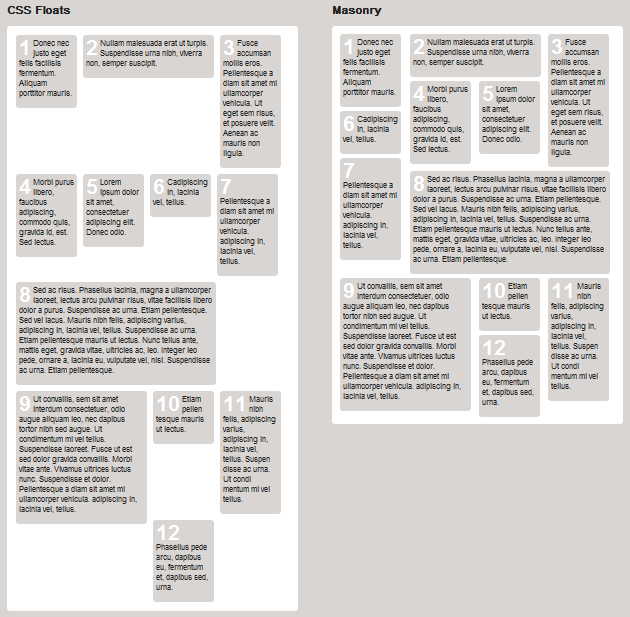
Basic initialization:
$(document).ready(function() {
    $('#container').masonry({
        singleMode: false,
        columnWidth: 210,
        itemSelector: '.box',
        resizeable: true,
        animate: true,
        animationOptions: {
            duration: 400,
            easing: 'linear'
        }
    });
});
Key parameters:
- singleMode — use when all blocks have equal width
- columnWidth — width of each grid column in pixels
- itemSelector — CSS selector for the block elements
- resizeable — rebuild the grid on window resize
- animate — enable/disable animation
- animationOptions — jQuery animate() options (duration, easing, etc.)
- appendedContent — used when dynamically appending new elements
I added a modification that animates the grid rebuild when the window is resized, which creates a great impression on users. The demo illustrates the before/after effect clearly.